How to scrape Google Maps in 2026: 4 methods
By Doug Nielsen, Product Manager · Updated · first published
To scrape Google Maps, search a category in an area, collect every listing, then open each one for its phone, website, address, rating and hours. One search stops at about 120 places, so a city takes one search per ZIP code. There are four ways to do it.
Our own Google Maps scraper does all of it for you, from the per-ZIP searches to the website visits for emails. Prefer code to a dashboard? The same jobs run through the Google Maps scraper API.
Key takeaways
- Copy by hand below 20 businesses; the Places API suits apps, not lead lists.
- A DIY scraper means constant upkeep, and emails still need every website parsed.
- A hosted scraper does searches, details and emails as one job, by dashboard or API.
- No method beats the per-search cap: search ZIP by ZIP, dedupe on place_id.
On this page10
The four methods compared
| Method | Effort | Emails | Cost | Best for |
|---|---|---|---|---|
| By hand | About a minute per business | No: Maps doesn't show them | Your time | Under about 20 businesses |
| Places API | Code and an API key | No email field | Per request, by SKU | Showing places inside your own app |
| Your own scraper | A first week of fixes, then endless upkeep | Only if it also parses every website | Your time and upkeep | A hobby project |
| A hosted scraper | Three steps, about 3 minutes | From each business's own website, at no extra credit cost in Hubertino | In Hubertino, 1 credit per business delivered; the first 100 free | Lead lists, by dashboard or API |
Option 1: copy it by hand
At about a minute per listing, 50 businesses take an hour, and Maps shows no emails.
Option 2: the official Google Places API
Results per search are capped (traditionally at 60), there's no email field, and Google's terms restrict storing the data beyond limited caching, which is what a lead list is. Google Places API vs scraping compares caps, fields and cost.
Option 3: write your own scraper
Playwright or Puppeteer can drive a real browser: search, scroll the feed to the end, open each place, extract the fields, then parse every website for emails.
Watch out
A fine hobby project, an expensive contact list
Option 4: a purpose-built tool (the 3-minute version)
In Hubertino the first 100 credits are free, no card needed.
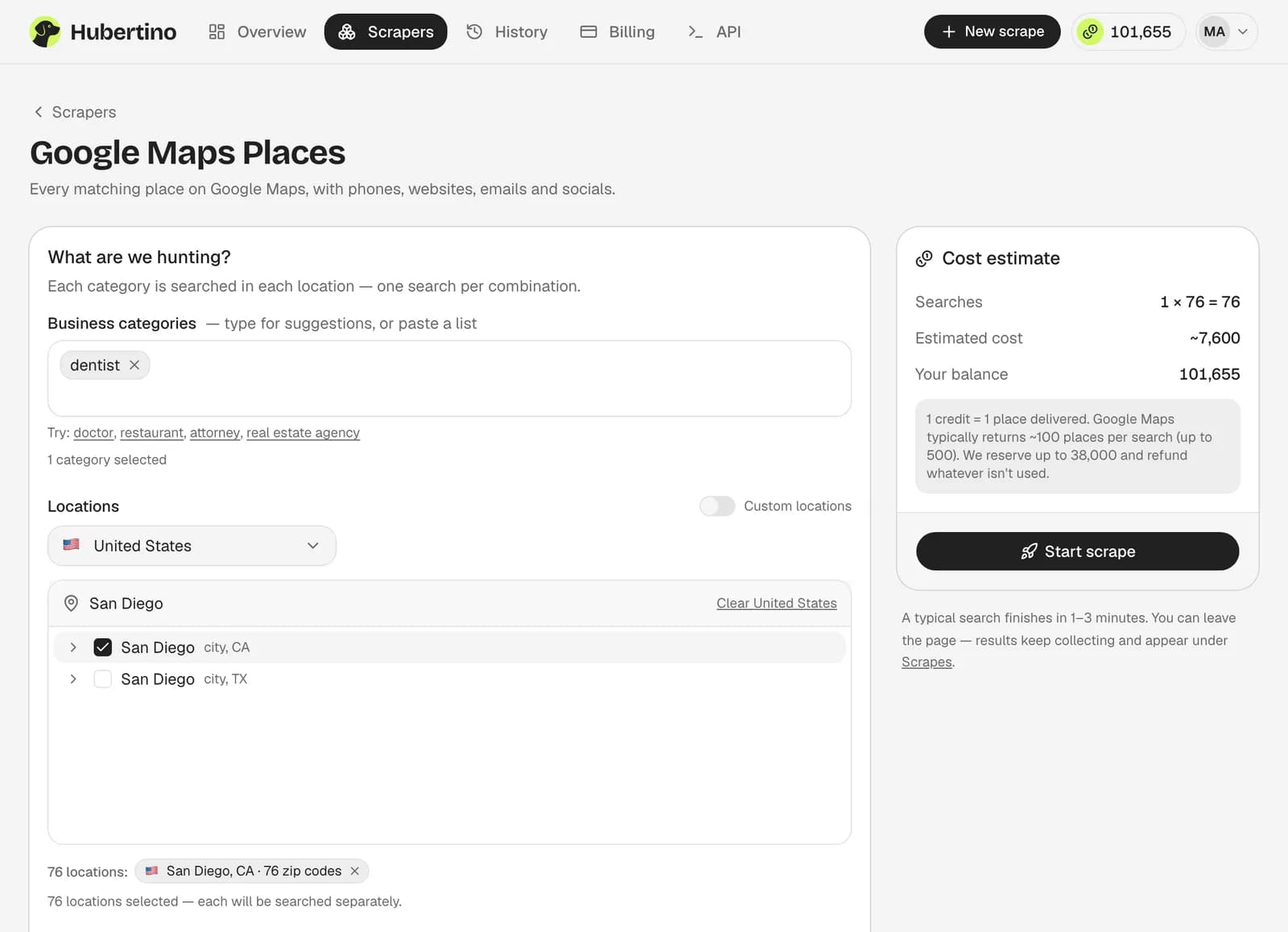
Describe the hunt
Type a category Google understands (“dentist”, “HVAC contractor”) and pick countries, states, cities or ZIP codes.Watch results stream in
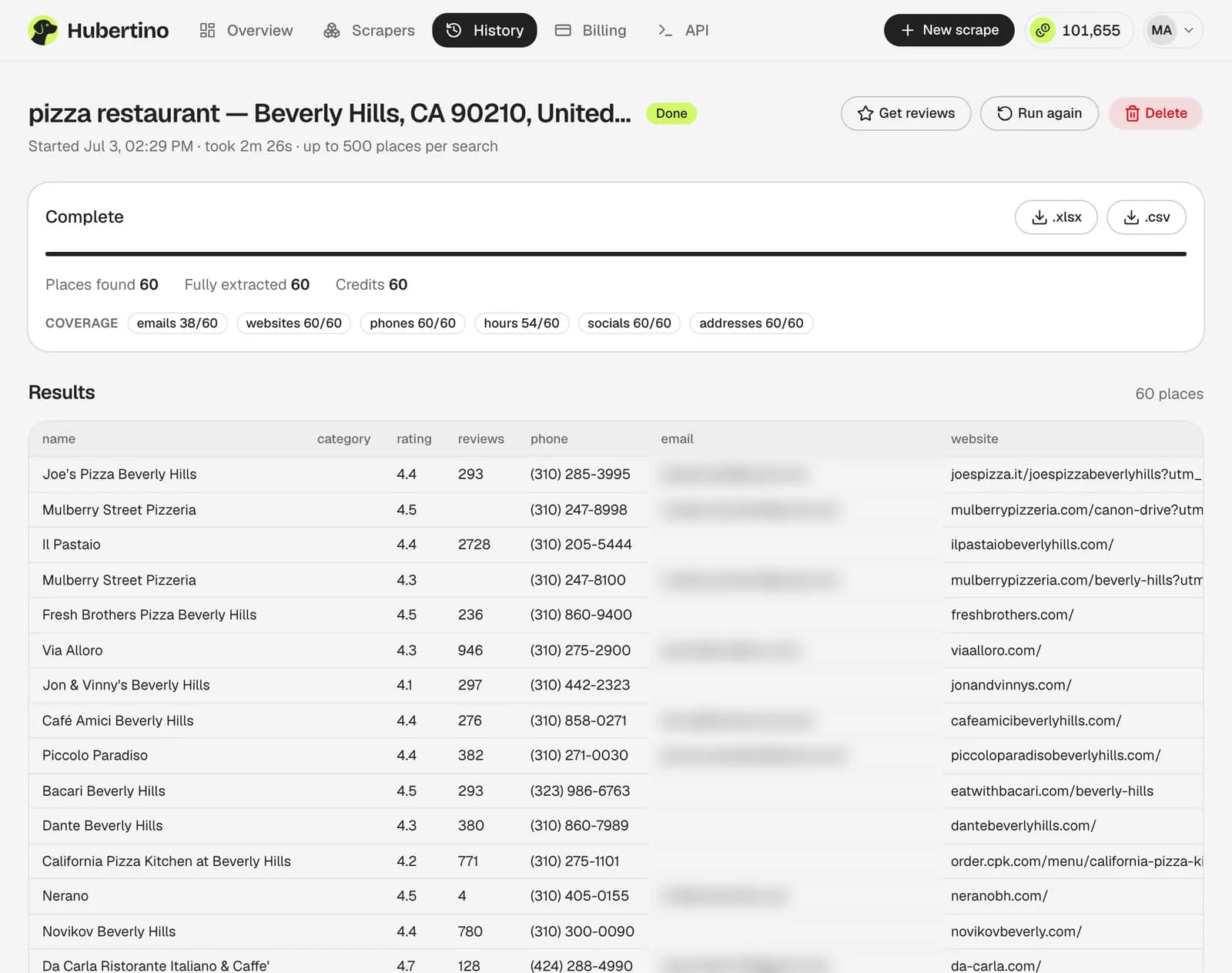
Each category × location pair becomes a search. Rows fill a live table, then gain phone, website, hours, and the email and socials from the business's own site.Export
Download XLSX or CSV (38 lead-focused columns) or use the REST API. One credit per business delivered; an empty search costs nothing.
The 120-result cap, in numbers
A search stops at roughly 100–120 places, however many exist, so coverage depends on how many searches you run, not on the tool.
Take San Diego's dentists (estimate: population times a national per-capita rate; the local market size calculator runs it for any town). The location picker splits the city into ZIP codes averaging about 24 dentists each; ZIP-code scraping covers a ZIP that still hits the cap.
- dentists in San Diego, by our rough estimate
- ~1,800
- reached by one city-wide search
- 7%
- ZIP-code searches reach nearly all
- 76
Watch out
Dedupe on place_id, not on name
Get the whole list in one job
- 100 free credits
- No card required
From code: the same scrape over an API
Our Google Maps scraper API takes the dashboard's inputs and returns finished rows: POST /api/v1/scrapes, poll GET /api/v1/scrapes/{id} until its status is done, then download /api/v1/scrapes/{id}/export as CSV or XLSX. From the docs' Python quickstart:
# pip install requests
import os, time, requests

API = "https://hubertino.com/api/v1"
session = requests.Session()
session.headers["Authorization"] = f"Bearer {os.environ['HUBERTINO_API_KEY']}"

def call(method, path, **kwargs):
    res = session.request(method, API + path, timeout=120, **kwargs)
    if res.status_code >= 400:  # every error body is {"error": "..."}
        raise SystemExit(f"HTTP {res.status_code}: {res.text}")
    return res

# 1. Start a scrape
scrape = call("POST", "/scrapes", json={
    "categories": ["dentist"],
    "locations": ["Austin, TX, United States"],
    "maxResults": 50,
    # "seoAudit": True, "findContacts": True,  # paid add-ons, Starter/Pro
}).json()["scrape"]

# 2. Poll until it finishes (and, with paid add-ons, until their charge is final)
while scrape["status"] not in ("done", "error") or scrape.get("addonsPending"):
    time.sleep(5)
    scrape = call("GET", f"/scrapes/{scrape['id']}").json()["scrape"]
if scrape["status"] == "error":
    raise SystemExit(scrape["error"])  # the reserved credits were refunded

# 3. Download the CSV
csv = call("GET", f"/scrapes/{scrape['id']}/export", params={"format": "csv"})
with open("leads.csv", "wb") as f:
    f.write(csv.content)
print(scrape["resultCount"], "businesses,", scrape["creditsCharged"], "credits charged")
Set HUBERTINO_API_KEY to a key from Dashboard → Settings; every account has API access, the free one included. maxResults caps each search (1–500), but a search rarely passes about 120 places, so add one location per ZIP code, written as the picker writes them (“San Diego, CA 92101, United States”), up to 2,000 searches per scrape.
Is scraping Google Maps legal?
Collecting business details that are publicly listed is generally lawful in the US and EU, but Google's Terms of Service restrict automated collection from Google Maps. What you then do with the data is regulated in its own right: in the UK and EU, GDPR covers keeping any record that identifies a person, and outreach falls under CAN-SPAM in the US, PECR in the UK, § 7 UWG in Germany, CASL in Canada and the Spam Act in Australia. This isn't legal advice; our legal guide goes into more detail.
Common questions
How many results can one search return?
Can I get emails from Google Maps?
Does scraping through the API cost more than the dashboard?
Written by
Doug Nielsen, Product Manager
Doug works on Hubertino; the guides on this site are published under his name. Last updated .