Export Google Maps search results to Excel or CSV
By Doug Nielsen, Product Manager · Updated · first published
Google Maps has no export button for search results. Of the three ways around it, Google Takeout exports only places you saved and My Maps only pins you added by hand; only the third, a scraper, runs the search and writes every listing to CSV or XLSX.
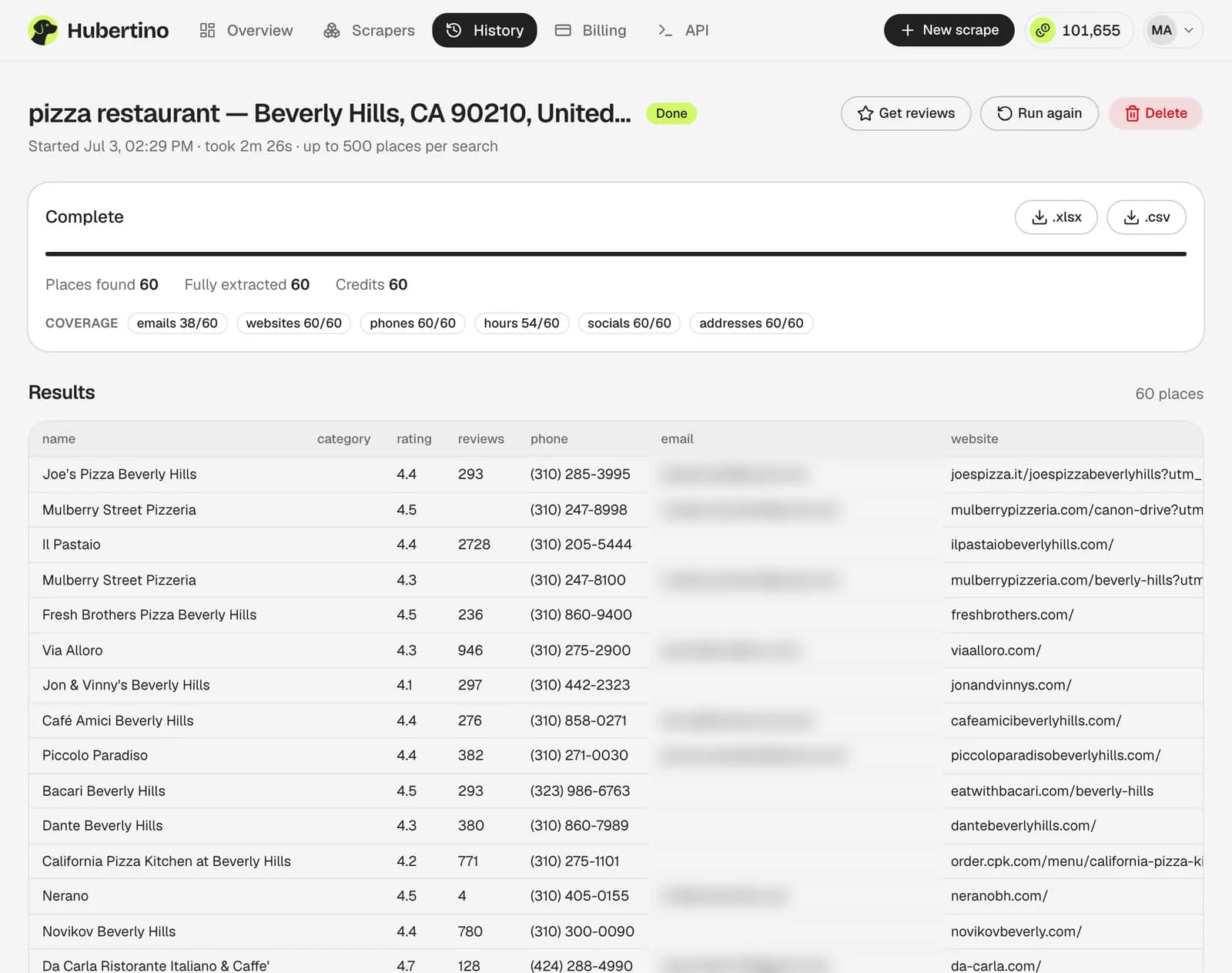
Hubertino's Google Maps scraper is that third way, with the email from each business's own website in the same row. Its Google Maps data extractor page defines all 38 columns and how often each one is filled.
Key takeaways
- Takeout files hold a name, your note and a link: no phones, websites or ratings.
- An export of about 120 rows probably means the search cap, not the market size.
- Open the XLSX; import a CSV with its ID columns set to Text.
On this page9
The three ways side by side
Under about 20 businesses, copying by hand is quicker than any of these.
| Way | What ends up in the file | Format | Search results? |
|---|---|---|---|
| Google Takeout | Places you saved to lists: each one's name, your note and a Google Maps link | CSV, one per list | No |
| My Maps | Pins you added to a map you made, one search result at a time | KML or KMZ; CSV per layer | One by one, by hand |
| A scraper | Every listing a search returns, with phone, website, address, rating, hours and more | CSV or XLSX | Yes, up to about 120 per search |
Way 1: Google Takeout (places you saved)
Choose the data
At takeout.google.com, click Deselect all, then tick Saved (your lists: Favorites, Want to go and your own). Maps (your places) adds starred places and reviews as GeoJSON.Create the export
Click Next step, then Create export. Google emails a download link.Open the CSV
The archive's Saved folder has one CSV per list: name, your note and link only, no phones or websites.
Way 2: My Maps (KML/KMZ to CSV)
In My Maps (mymaps.google.com) you add search results one at a time (search, click a result, Add to map). A layer holds up to 2,000 places and a map 10,000, but each goes in by hand, so it suits a shortlist.
Export one layer as CSV
Open the layer's ⋮ menu, choose Export data, then CSV: one row per place with name, description, coordinates and your own columns.Or export the whole map as KML
From the map's ⋮ menu choose Export to KML/KMZ and tick the box for a .KML file. A KMZ is zipped KML plus icons: rename it .zip and unzip it for doc.kml.Convert the KML to CSV
In QGIS (free), use Layer → Add Layer → Add Vector Layer, then right-click the layer, choose Export → Save Features As, pick Comma Separated Value [CSV] and set GEOMETRY to AS_XY under Layer Options, so coordinates come out as X and Y columns.
Way 3: a scraper export (search results)
A scraper runs the search, opens each listing and writes one row per business: extensions in your browser, hosted scrapers on their servers, some adding emails from each website. Hubertino's XLSX or CSV always has the same 38 base columns in the same order; an existing-contact column and paid add-on columns follow them when a scrape uses them:
| Group | Columns |
|---|---|
| Search and identity | query, name, category |
| Contact | phone, email, website, domain |
| Social profiles | company_facebook, company_instagram, company_x, company_youtube, company_linkedin |
| Address | address, street, city, state, state_code, postal_code, country, country_code |
| Coordinates | latitude, longitude, plus_code |
| Reputation | rating, reviews |
| Business details | business_status, price_range, service_options |
| Opening hours | working_hours, working_hours_csv |
| Action links | order_links, reservation_links, menu_link |
| Google references | location_link, place_id, google_id, cid, kgmid |
The column template is that header row alone, for mapping CRM fields; the sample CSV is a filled-in example with the add-on columns too (fictional businesses, decision makers masked).
Get the whole list in one job
- 100 free credits
- No card required
Why an export stops at about 120 rows
Every tool reading Google Maps hits the same per-search cap. Search one ZIP or postal code at a time and dedupe the overlaps on place_id; Hubertino's location picker does the split, and ZIP-code scraping explains why it works.
- places per Google Maps search, however many exist
- 100–120
- ZIP-code searches to cover San Diego
- 76
Getting it into Google Sheets
For a one-off, choose File → Import → Upload in Sheets, pick the CSV or XLSX and select Insert new sheet(s).
Or skip the file: our free Google Sheets script runs a scrape from a spreadsheet menu and syncs rows on place_id, updating existing ones and appending new ones.
Watch out
Importing a CSV? Untick one box
Excel tips for the file you'll get
The XLSX stores phones, postal codes and Google's IDs as text. Double-click a CSV and Excel guesses: a ZIP code like 02134 loses its leading zero, a CID (usually 19 or 20 digits) loses digits past 15, and accented names may garble, since the CSV is UTF-8 without a byte-order mark.
Import the CSV, don't double-click it
Data → From Text/CSV, with File Origin set to 65001: Unicode (UTF-8).Set the ID columns to Text
In Transform Data, set phone, postal_code, place_id, google_id and cid to Text (Replace current), then load.Tidy the sheet
Freeze the header row, filter business_status to drop CLOSED_PERMANENTLY rows, and pivot on city or category.
Common questions
Can I export Google Maps search results for free?
Why does my export stop at 120 rows?
Does Google Takeout include phone numbers or addresses?
Can I schedule repeat exports of the same search?
Written by
Doug Nielsen, Product Manager
Doug works on Hubertino; the guides on this site are published under his name. Last updated .