A Google Maps Chrome extension alternative that runs in the cloud

By Doug Nielsen, Product Manager · Updated · first published

Competitor facts checked: September 2026. Each figure links the page it came from.

There are dozens of Google Maps extractor extensions for Chrome and other browsers, and they all work the same way: they read the results your own browser has already loaded. That makes them fast, cheap and often free — and it also means your list is limited to what one search view can show you, while your laptop stays open. Hubertino does the same job server-side, with emails and socials included from the first free credit.

Pick Hubertino if you…

  • • want jobs to run in the cloud instead of tying up your browser
  • • need a whole city or region, not one search view's worth of results
  • • want emails and socials without paying for a higher plan first
  • • want an API, saved jobs and exports you can rerun

Stick with an extension if you…

  • • only need a handful of businesses from the map you're already looking at
  • • want zero signup and zero cost for tiny, occasional grabs
  • • pull a lot and want a flat fee or a one-time licence: paid extensions start at $9.90 a month billed yearly, or $149 once
Side by side

Google Maps extensions figures come from its own pages, checked September 2026 and linked under each cell; rows without a link describe the product in general terms.

HubertinoGoogle Maps extensions
Where the scrape runsCloud — close your laptopYour browser tab
Results per searchWhole metros via zip-code expansionAbout 120, the limit of Google Maps' results list
(mapsscraper.com/pricing, checked Sep 2026)
EmailsIncluded in every scrape, free credits tooIncluded on the paid plans of all 4 we checked; Map Lead Scraper's and G Maps Extractor's free plans leave them out
Social profilesFacebook, Instagram, LinkedInPartly
Export38-column XLSX / CSVCSV and Excel on all 4 we checked; Mapsscraper and G Maps Extractor add JSON
Cost1 credit = 1 business, $0.276–$0.58 per 1,000; 100 free to startFree tiers with limits; paid from $9.90 a month billed yearly, or $149 once for a lifetime licence
SetupSign up, nothing to installInstall an extension

Weighing up cost across tools? See Outscraper vs Scrap.io vs Apify pricing for the cost per 1,000 businesses on each, worked through at the same volumes.

Google Maps extensions we've checked

  • Mapsscraper — A Chrome extension (Edge too) at a flat $19 a month with no record limit, emails from business websites, and 120 results per search. (mapsscraper.com/pricing, checked Sep 2026)
  • Map Lead Scraper — A Chrome/Edge extension: $9.90–$19.90 a month for 100,000 leads with emails on Pro; the free plan exports 1,000 a month without emails. (mapleadscraper.com, checked Sep 2026)
  • Leads Sniper — A Chrome/Edge extension sold as a $149 lifetime licence with unlimited leads and emails; a free licence covers 50 leads. (leads-sniper.com/pricing, checked Sep 2026)
  • G Maps Extractor — Cloud, browser-extension and API plans, each priced on its own; the cloud plans run $19–$149 a month for 20,000–500,000 records, with emails on paid plans only. (gmapsextractor.com/pricing, checked Sep 2026)

What using Hubertino looks like

Here's how Hubertino's Google Maps scraper works:

  1. 1. Describe the hunt. Type a business category (“dentist”, “roofing contractor”, anything) and pick locations — whole countries, states, cities or zip codes from the built-in picker.
  2. 2. Watch it fill. Results stream into a live table as they're found: phone, website, then the email and socials dug from each business's site.
  3. 3. Export and go. Download XLSX/CSV — one business per row — or pull it via the API. You're only charged for what was actually delivered.
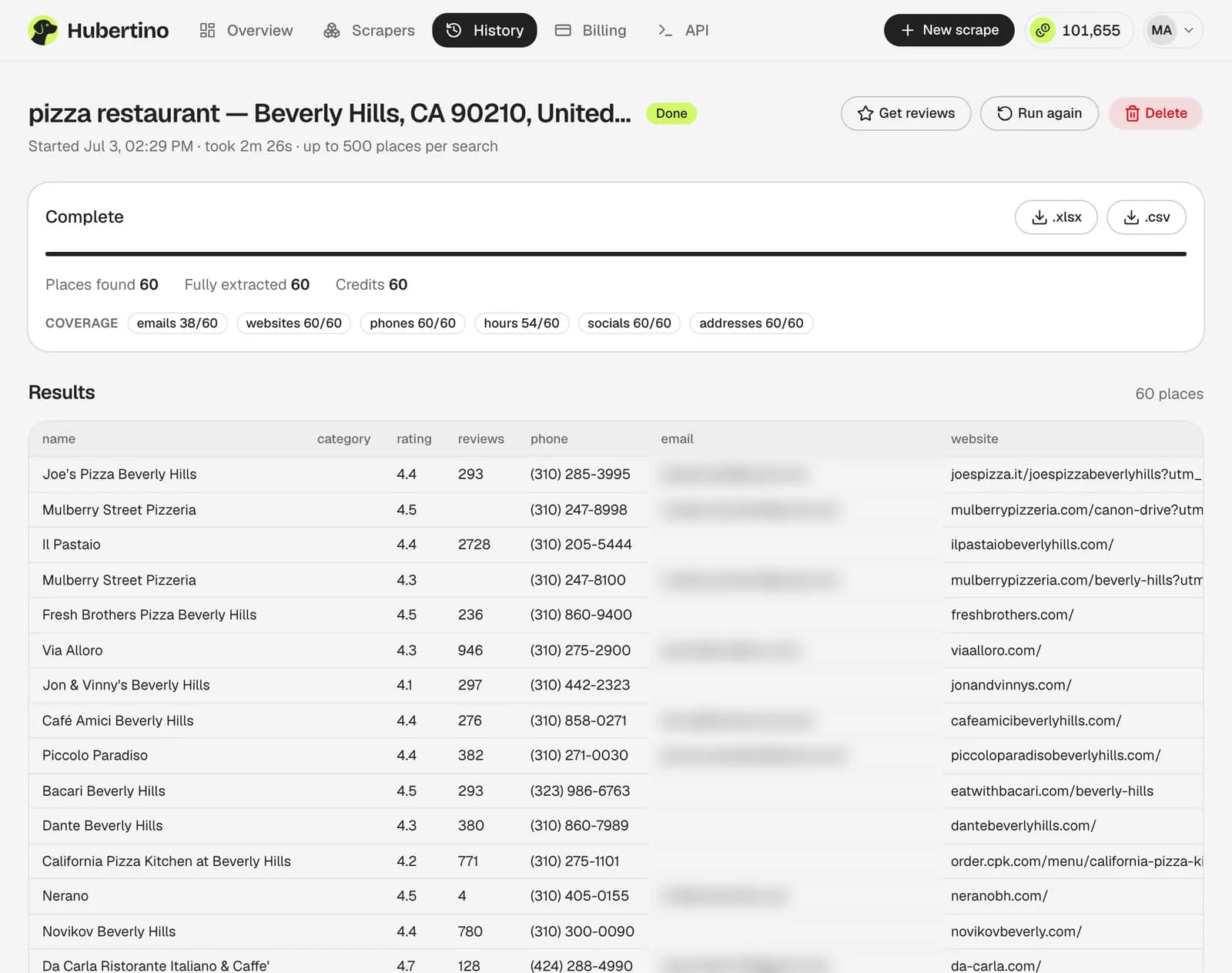
A finished Hubertino scrape of 60 pizza restaurants in Beverly Hills: coverage counts per field, a results table with phones and websites, and .xlsx and .csv download buttons (emails blurred)
A finished Hubertino run: 60 pizza restaurants in Beverly Hills, with coverage counts for every field and one-click .xlsx or .csv export. (Emails blurred here.)
Try it free — 100 credits

Questions

What's the main limitation of Google Maps scraper extensions?

They can only take what your browser can see. Google's results feed shows roughly 100-120 businesses per search, so that's the ceiling — and because the work happens in your tab, the machine has to stay awake and the job competes with whatever else you're doing.

Do Google Maps extensions give emails?

The paid ones we checked do: all 4 include emails on their paid plans, and Map Lead Scraper's and G Maps Extractor's free plans leave them out (checked September 2026). Emails aren't on the Google Maps listing, so they have to come from each business's own website. Hubertino crawls it server-side, in the same credit, from the first free one.

Are Google Maps extensions safe to use?

That varies a lot by extension, and it's worth checking permissions before installing anything that reads pages you're logged into. Hubertino runs entirely on our servers, so nothing is installed in your browser and nothing touches your Google session.

Is an extension ever good enough?

Often, yes. For twenty nearby businesses to call this afternoon, an extension is quicker and usually free. Hubertino earns its keep when the list is hundreds or thousands of businesses and you need contacts attached.

Does Hubertino have an API?

Yes — a REST API with an OpenAPI spec (create a scrape, poll status, fetch results, export files; Bearer-key auth), on every plan, plus free n8n templates that send leads to Google Sheets or HubSpot.

Google Maps extensions is a trademark of its owner and isn't affiliated with Hubertino. This page is our honest take on when each tool fits — see also our comparison of Google Maps scrapers.

More comparisons

Try it on your own niche

Start free with 100 credits — enough for a real lead list. No card required.

Start free with 100 credits