Google Maps data extractor: every business, emails included.
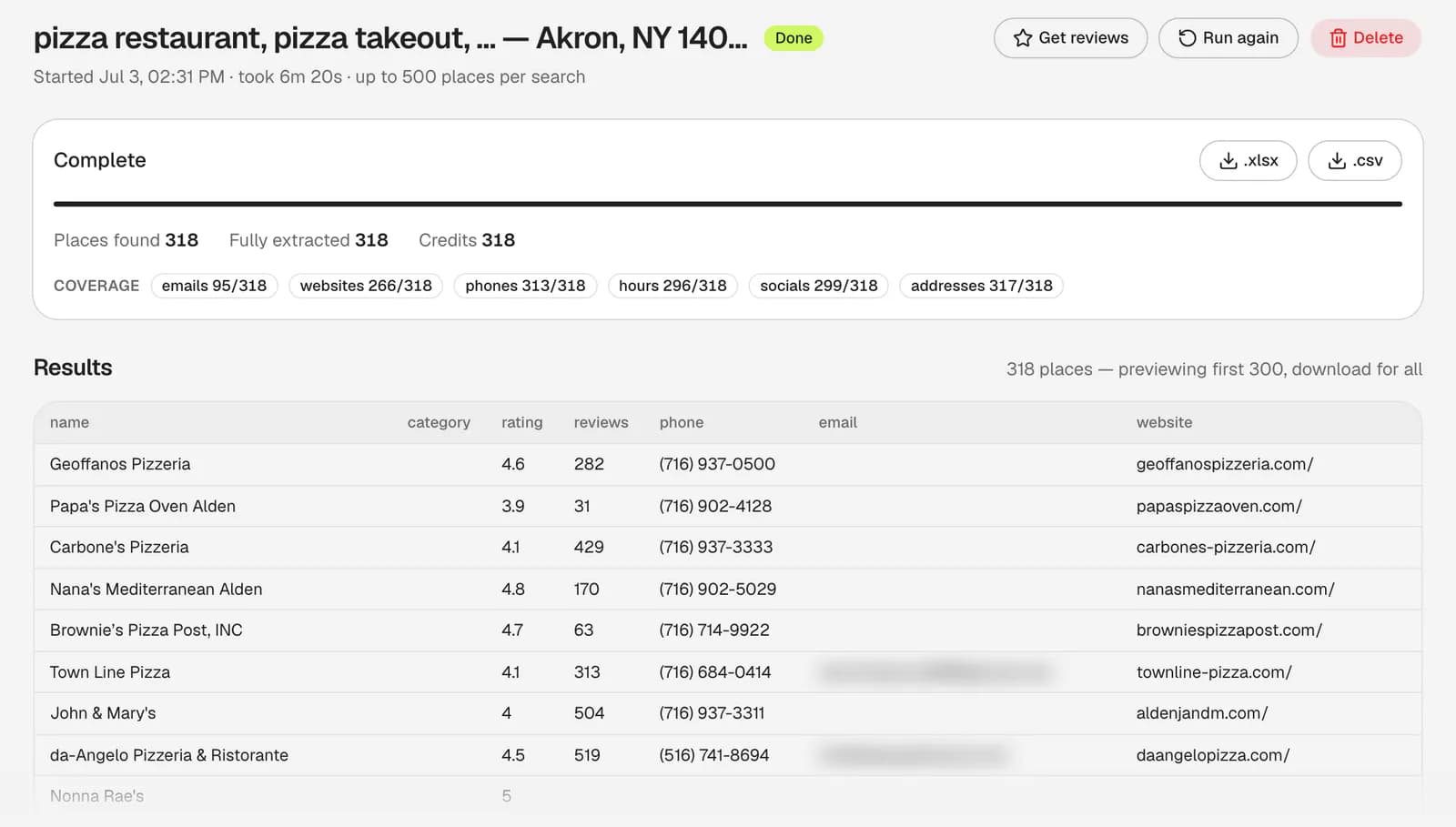
Hubertino's Google Maps scraper turns a search into one row per business: name, phone, website, rating and review count from the listing, plus the email and socials from its own website.
- No card required
- Pay per result
- XLSX · CSV · API
What is a Google Maps data extractor?
A Google Maps data extractor turns a Google Maps search into a lead list: every business it finds, one row each, that you can qualify by rating and reviews and reach by phone or email. It's also called a Google Maps business extractor or places scraper. Hubertino's finds the email on each business's own website, which the listing doesn't show.
Where the data comes from
- Google Maps
- Their website
- Its reviews
On Google Maps
- Kestry Dental Co
name
- kestrydental.com
website - +1 929 555 0164
phone
On their website
- [email protected]
email
In your sheet
- name
- Kestry Dental Co (from the Google Maps listing)
- phone
- +1 929 555 0164 (from the Google Maps listing)
- [email protected] (from the business's website)
- website
- kestrydental.com (from the Google Maps listing)
- rating
- 4.9 (from the Google Maps listing)
- reviews
- 341 (from the Google Maps listing)
A separate job for the reviews themselves: one row per review, at 1 credit per review.
Its reviews, on Google Maps
- Booked online on a Sunday, seen on Tuesday. Gentle with a nervous patient, and no upselling.
text
In a reviews sheet
- place_name
- Kestry Dental Co (from its reviews)
- rating
- 5 (from its reviews)
- text
- Booked online on a Sunday, seen on Tuesday. Gentle… (from its reviews)
- owner_response
- Thank you! See you in six months. (from its reviews)
Plus 32 more columnsCategory, address parts, coordinates, socials, opening hours, booking links and Google's IDs. See all 38, with what each holds, and the paid add-ons' columns.
| Column | ColumnWhat it holds |
|---|---|
| Search and identity | |
| query | queryThe search that found the business: your category and location, as sent to Google Maps. |
| name | nameThe business name as it appears on Google Maps. |
| category | categoryGoogle's categories for the listing, comma-separated, e.g. “Dentist, Cosmetic dentist”. |
| Contact | |
| phone | phoneThe phone number on the listing, as Google shows it. |
emailA contact email from the business's own website: the homepage first, then up to two contact or imprint pages. One address per business, preferring one on its own domain. | |
| website | websiteThe website link on the listing. Sometimes a Facebook, Instagram or booking page rather than a site of the business's own. |
| domain | domainThe website's host without “www.”, for de-duplicating and matching against other lists. |
| Social profiles | |
| company_facebook | company_facebookFacebook page, found on the business's website or its Google business panel. |
| company_instagram | company_instagramInstagram profile, from the same two sources. |
| company_x | company_xX (Twitter) profile, from the same two sources. |
| company_youtube | company_youtubeYouTube channel, from the same two sources. |
| company_linkedin | company_linkedinLinkedIn page, from the same two sources. With the decision-maker add-on, also from the company's professional profile when neither had one. |
| Address | |
| address | addressThe full address on one line, as Google formats it. |
| street | streetStreet and number. |
| city | cityCity or town. |
| state | stateState, province or region, spelled out. |
| state_code | state_codeThe short state or province code where the country uses one, e.g. NY, ON, NSW. |
| postal_code | postal_codeZIP or postcode. |
| country | countryCountry name. |
| country_code | country_codeTwo-letter ISO country code, e.g. US, GB, DE. |
| Coordinates | |
| latitude | latitudeLatitude of the place pin, in decimal degrees. |
| longitude | longitudeLongitude of the place pin, in decimal degrees. |
| plus_code | plus_codeGoogle's Plus Code for the spot, where the listing shows one. |
| Reputation | |
| rating | ratingAverage Google star rating, 1.0 to 5.0. |
| reviews | reviewsNumber of Google reviews. |
| Business details | |
| business_status | business_statusOPERATIONAL, CLOSED_TEMPORARILY or CLOSED_PERMANENTLY. |
| price_range | price_rangeGoogle's “price per person” band, where the listing shows one (mostly restaurants and cafés), e.g. “$20–30”. |
| service_options | service_optionsThe listing's service chips, comma-separated: Dine-in, Takeout, Delivery, In-store shopping and the like. |
| Opening hours | |
| working_hours | working_hoursWeekly opening hours, one entry per day, as JSON. |
| working_hours_csv | working_hours_csvThe same hours flattened into a single text cell. |
| Action links | |
| order_links | order_linksOnline ordering links the listing offers (delivery apps or the business's own), up to three. |
| reservation_links | reservation_linksThe table-booking link on the listing. |
| menu_link | menu_linkThe menu link on the listing. |
| Google references | |
| location_link | location_linkThe place's Google Maps URL. |
| place_id | place_idThe Places API place ID, for joining with Google's own API data. |
| google_id | google_idGoogle Maps' feature ID for the place, in 0x…:0x… form. |
| cid | cidThe listing's CID: the second half of google_id as a decimal number. |
| kgmid | kgmidThe place's Google Knowledge Graph ID, a /g/… or /m/… path. |
| SEO audit (paid add-on) | |
| website_type | website_typeWhat the listing's website really is, in plain English: own website, no website, a social profile, a booking page, a directory listing, unreachable… Free on every place. |
| seo_score | seo_scoreA 0–10 SEO score for each own website we could check. |
| seo_issues | seo_issuesThat site's top three SEO issues, in plain sentences, joined with “ | ”. |
| Decision makers (paid add-on) | |
| company_size | company_sizeThe company's employee band, e.g. “11-50 employees”. |
| contact_1_name | contact_1_nameThe most senior decision maker we found: an owner, founder, CEO or other top executive. |
| contact_1_title | contact_1_titleTheir current job title. |
| contact_1_linkedin | contact_1_linkedinTheir LinkedIn profile. |
| contact_1_email | contact_1_emailA work email when one is known. It's often inferred from the company's email pattern, so verify it before you send. |
| contact_2_name | contact_2_nameA second decision maker, when there is one. |
| contact_2_title | contact_2_titleThe second decision maker's job title. |
| contact_2_linkedin | contact_2_linkedinThe second decision maker's LinkedIn profile. |
| contact_2_email | contact_2_emailThe second decision maker's work email, often inferred too. |
Every export has these columns, in this order; a paid add-on (Website Analysis or Lead Enrichment) adds its own after them. See them filled in the sample XLSX (fictional businesses, decision makers masked).
From one search to a full sheet
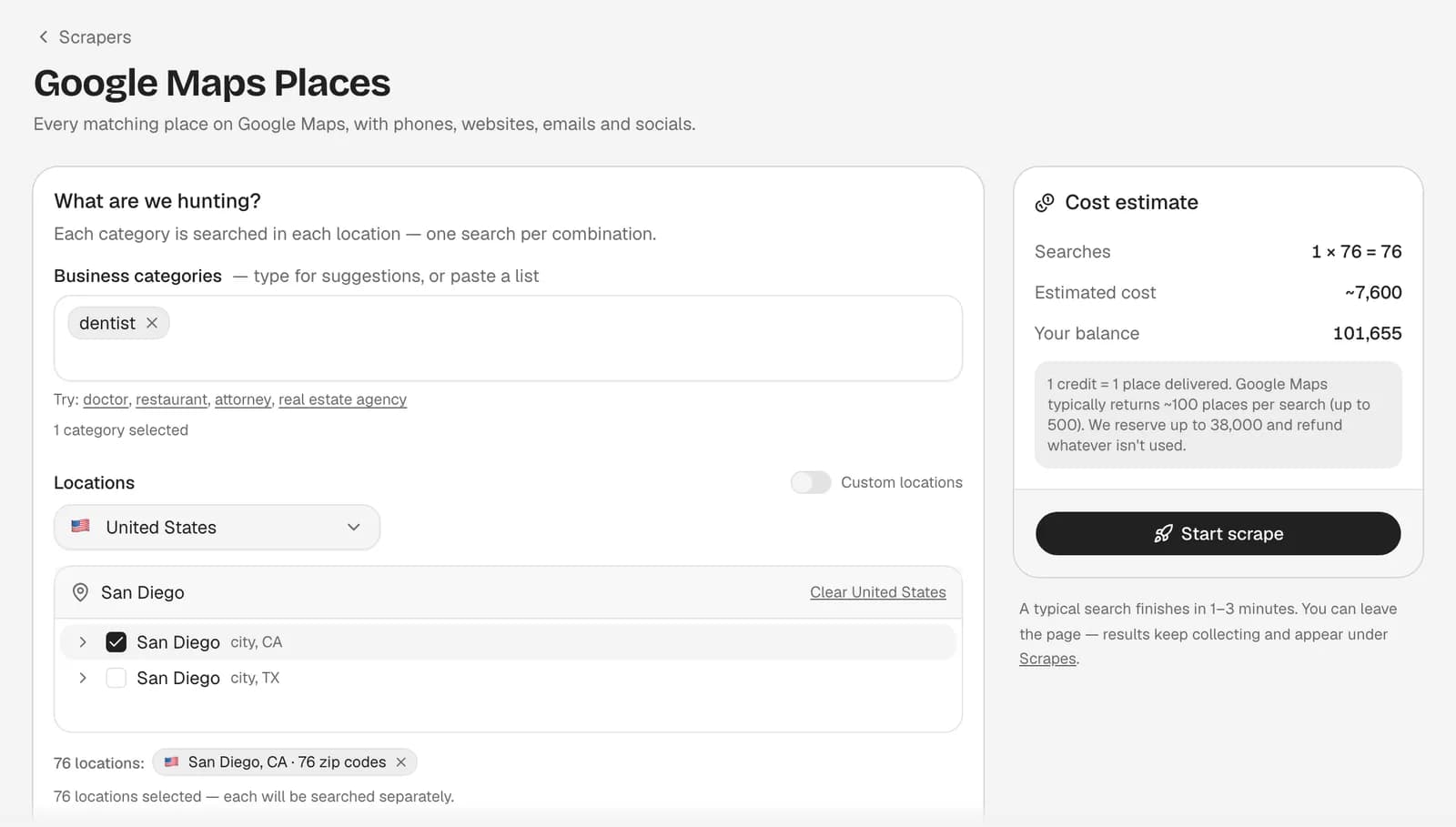
Describe the hunt
Categories and locations, down to postcodes, with a live cost estimate.It runs live on Google Maps
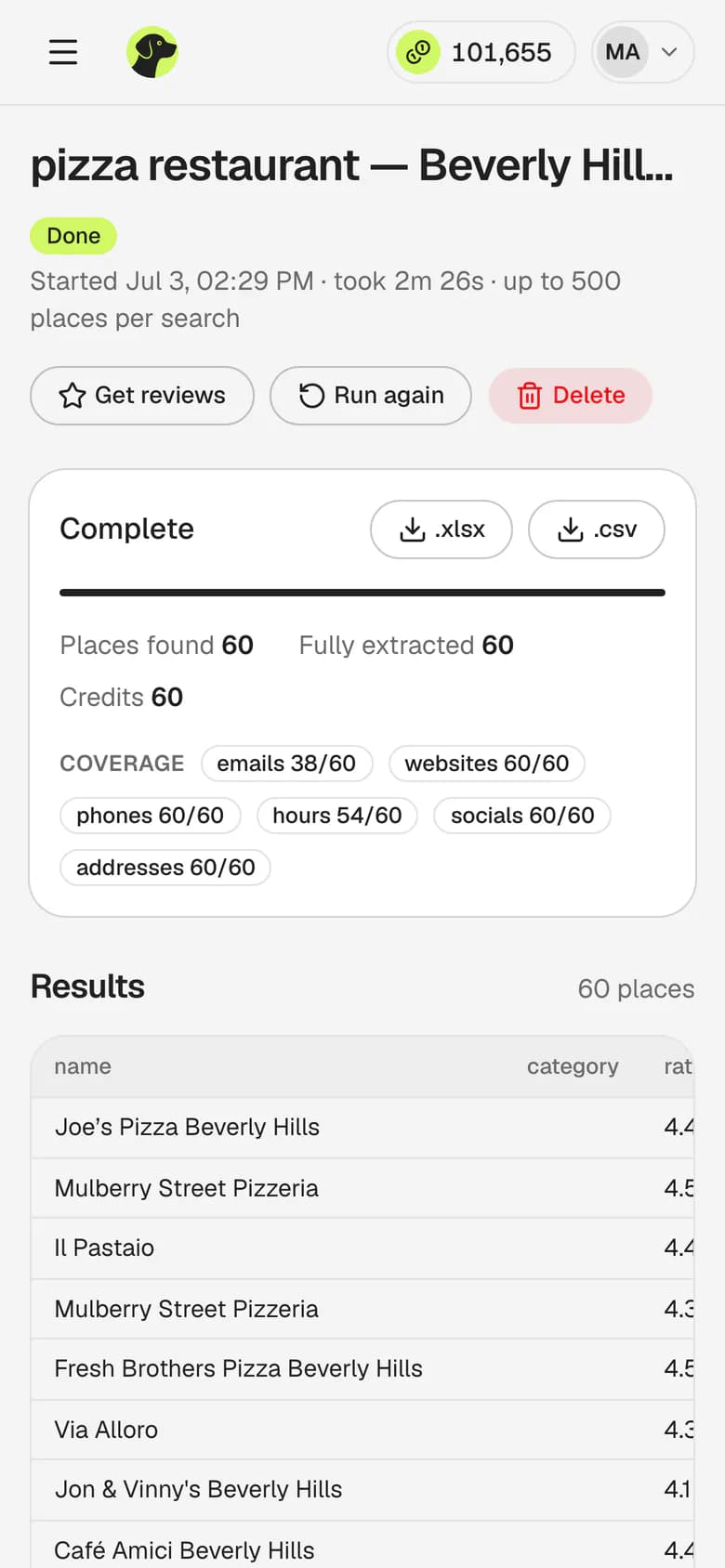
Each category × location is its own search; each website is checked for an email and socials.Export or pull the rows
XLSX, CSV or JSON over the API. Reserved credits a job doesn't use come back.
Turn the rows into revenue
For web designers
Nail salons with no website
- Filter
category= nail salonwebsitenone or social
- Sell
- A website, or a booking page that works.
- Who fits
- 29.7%of nail salons have no site of their own8.9% across all industries
For SEO agencies
Accountants with under 20 reviews
- Filter
category= accountantreviews< 20
- Sell
- Review requests and local SEO.
- Who fits
- 40.9%of accountants have fewer than 20 reviews13.1% across all industries
For reputation agencies
Gyms rated under 4.0
- Filter
category= gymrating< 4.0
- Sell
- Reputation management and review replies.
- Who fits
- 8.8%of gyms are rated under 4.0 stars2.6% across all industries
For suppliers & B2B sales
Coffee shops in your delivery area
- Filter
category= coffee shop- your zip codes
- Sell
- Your beans, machines or software, by email or phone.
- Who fits
- Allthe coffee shops Google Maps lists thereOne search per zip code, not just page one
Review data
Reviews tell you what to pitch
Rating and review count are columns in every places export, at no extra cost, so you can qualify a list before reading a word. The Google Maps reviews scraper goes deeper: each review in full, one row per review, with its stars, date, text and the owner's reply. It's a separate job at 1 credit per review delivered, started from a finished scrape or from pasted Maps links.
- Quote their own customers Open with the complaint their reviews keep repeating, like missed calls.
- Find the silent ones An empty
owner_responsemeans nobody answers reviews: a review-management client. - Read the competition A rival's one- and two-star reviews show what its customers still want.
- Search for your problem Filter the text for what you fix, like “booking”: those businesses are your list.
How we counted
The shares are of the 70,643 businesses in 6,399 lead-list samples (the top Google Maps results for one category in one city, 324 cities) scraped with Hubertino from July 2026 to September 2026. Each card names the industry where its share is highest, among industries with at least 30 listings; the line under it is the share across every industry. “No site of their own” means no website on the listing, or only a social or booking page. The review and rating shares are out of the listings that show a count or a rating. The coffee-shop list is whatever your own search returns. Each sample is the top of one search, so a full sweep of a city can come out differently. A share says how many businesses fit a filter, not what any of them will buy.
Pick a play. Pull the list.
The same data over the API
Send categories, locations and maxResults, poll, then page the rows as JSON or download XLSX or CSV: the same 38 columns, on every plan, free included.
Auth, paging and error codes are in the Google Maps scraper API reference.
curl https://hubertino.com/api/v1/scrapes \ -H "Authorization: Bearer $HUBERTINO_API_KEY" \ -H "content-type: application/json" \ -d '{ "categories": ["dentist"], "locations": ["Austin, TX"], "maxResults": 50 }'Python examplestart → poll → download
import os, time, requests API = "https://hubertino.com/api/v1"KEY = os.environ["HUBERTINO_API_KEY"]s = requests.Session()s.headers["Authorization"] = f"Bearer {KEY}" # 1. Start a scrapescrape = s.post(f"{API}/scrapes", json={ "categories": ["dentist"], "locations": ["Austin, TX"], "maxResults": 50,}).json()["scrape"] # 2. Poll until it finisheswhile scrape["status"] not in ("done", "error"): time.sleep(5) scrape = s.get(f"{API}/scrapes/{scrape['id']}").json()["scrape"]if scrape["status"] == "error": raise SystemExit(scrape["error"]) # reserved credits come back # 3. Download the CSVcsv = s.get(f"{API}/scrapes/{scrape['id']}/export?format=csv")csv.raise_for_status()open("leads.csv", "wb").write(csv.content)- POST
/api/v1/scrapesStart a scrape - GET
/api/v1/scrapes/{id}Status and credits - GET
/api/v1/scrapes/{id}/resultsRows as JSON, paged - GET
/api/v1/scrapes/{id}/exportThe finished file, CSV or XLSX?format=csv
Start free. Scale when it works.
- FreeNo cardFree100 credits on signupStart free
- RecommendedStarterFor ongoing prospecting$19/mo50,000 credits / monthSee Starter
- ProFor teams and heavy pipelines$69/mo250,000 credits / monthSee Pro
From $0.276 per 1,000 businesses when a month's credits are used. Full plan details on the pricing page.
Questions
What does the Google Maps data extractor export?
Does every business come with an email?
What can I do with Google Maps review data?
Is scraping Google Maps legal?
How is this different from the Google Places API?
How many businesses can I scrape at once?
Which countries does it cover?
Do I need to write any code?
What does it cost?
Can I skip businesses I already have?
Your customers are on the map
- No card required
- Pay per result
- Unused reservations refunded